

Description
Download LexiLogos Arabic Keyboard – Free Virtual Arabic Typing Tool for Windows, Mac, Android & iOS
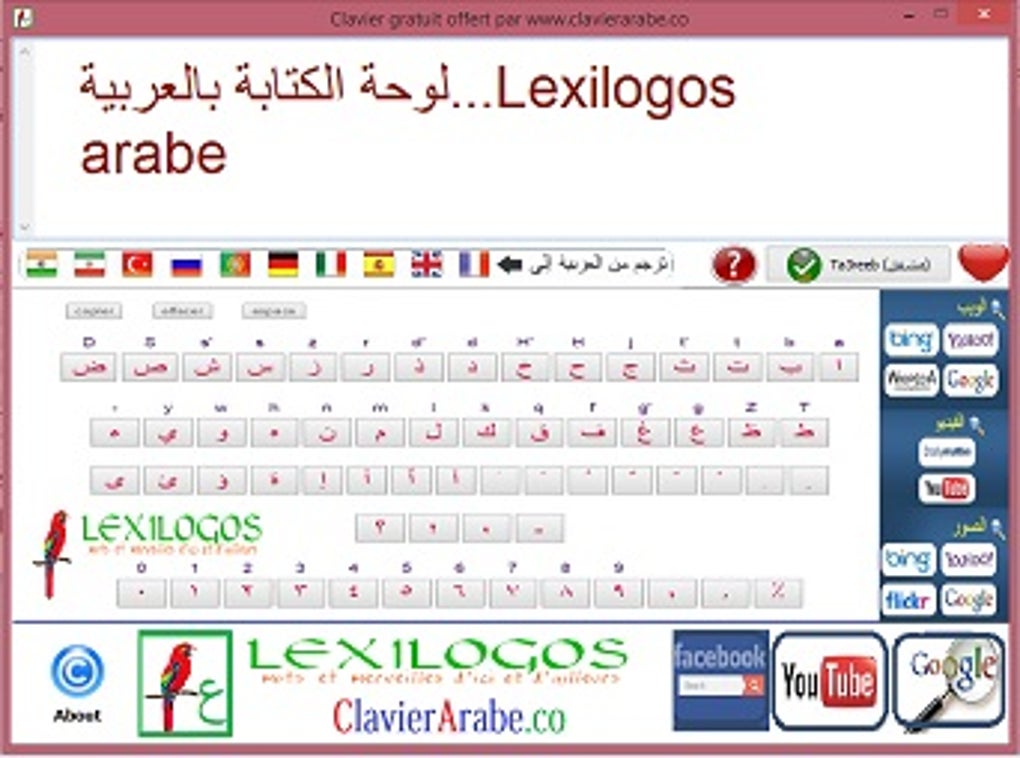
Looking for a reliable and easy-to-use virtual Arabic keyboard? LexiLogos Arabic Keyboard is a powerful, free tool designed for users who need to type Arabic without a physical Arabic keyboard. This software allows you to write Arabic letters using your standard QWERTY or AZERTY keyboard through intuitive transliteration. Whether you're a student, translator, or someone learning Arabic, LexiLogos simplifies Arabic input with natural typing patterns. The app supports multiple platforms including Windows, Mac, Android, and iOS, making it a versatile solution for anyone needing to type in Arabic. With built-in transliteration, real-time conversion, and seamless integration with online platforms like Google, YouTube, and Facebook, LexiLogos ensures you can communicate in Arabic effortlessly. Best of all, it’s completely free, secure, and portable—no installation required on some versions. Keep your digital workspace clean and efficient with this lightweight, feature-rich typing assistant.
Why LexiLogos Arabic Keyboard Stands Out Among Virtual Typing Tools
When it comes to typing Arabic on non-Arabic keyboards, LexiLogos Arabic Keyboard stands out as one of the most intuitive and user-friendly solutions available today. Unlike traditional input methods that require memorizing complex key combinations or switching between keyboard layouts, LexiLogos uses a natural transliteration system. This means you type Arabic words using Latin letters—just like you would spell them phonetically—and the software instantly converts them into proper Arabic script. For example, typing “salam” becomes “سَلَام”, and “ahlan” turns into “أَهْلًا”. This approach is especially beneficial for beginners or those learning Arabic, as it reduces the learning curve significantly.
One of the most impressive features of LexiLogos is its real-time conversion engine. As you type, the app dynamically updates the Arabic output, allowing for fast and accurate input. This is ideal for writing emails, social media posts, or even academic papers in Arabic. The tool also supports both Modern Standard Arabic and several regional dialects, giving users flexibility depending on their needs. Another major advantage is its portability. The application can be run from a USB drive or downloaded directly, making it perfect for users who work across multiple devices or prefer not to install software on their computers.
Additionally, LexiLogos integrates seamlessly with web browsers and popular platforms like Google, YouTube, Facebook, and WhatsApp. You can copy and paste your Arabic text directly into search bars, comments, or messages without any hassle. The app also includes a built-in dictionary lookup function that allows you to search for Arabic words online and instantly see their translations in English or other languages. This makes LexiLogos not just a keyboard, but a full-fledged language assistance tool. Whether you're a language learner, a content creator, or a professional translator, LexiLogos ensures you can communicate in Arabic with confidence and ease.
How to Install and Use LexiLogos Arabic Keyboard on Windows, Mac, Android & iOS
Getting started with LexiLogos Arabic Keyboard is quick and straightforward, regardless of your operating system. For Windows users, visit the official LexiLogos website and download the installer file. The setup process is simple—just run the .exe file, follow the on-screen instructions, and you’re ready to go. Once installed, the virtual keyboard appears as a floating window that you can position anywhere on your screen. To use it, simply click inside any text field (like a browser search bar or document), then start typing in Latin letters. The app will instantly convert your input into Arabic script.
Mac users can download the .dmg file from the same site. After opening the file, drag the LexiLogos app into your Applications folder. Launch the app, and it will automatically appear in your menu bar. You can toggle the keyboard on and off with a single click, making it ideal for quick typing sessions. For Android users, the LexiLogos app is available on the Google Play Store. Search for “LexiLogos Arabic Keyboard,” install it, and enable it in your device’s settings under “Language & Input.” From there, you can switch to the LexiLogos keyboard anytime you want to type in Arabic.
iOS users can also download the app from the App Store. After installation, go to Settings > General > Keyboard > Keyboards > Add New Keyboard, and select LexiLogos Arabic. Once enabled, you can switch between keyboards using the globe icon on the iOS keyboard. The app supports touch typing and auto-correction, ensuring accuracy even on smaller screens. No matter which device you use, LexiLogos ensures a consistent and smooth typing experience. Plus, updates are released regularly to fix bugs and improve performance, so your tool stays secure and up-to-date.
Key Features and Benefits of LexiLogos Arabic Keyboard
- Natural Transliteration System – Type Arabic words phonetically using Latin letters for instant conversion into proper Arabic script.
- Multi-Platform Support – Available for Windows, Mac, Android, and iOS, ensuring compatibility across all devices.
- Real-Time Conversion – See your Arabic text appear instantly as you type, improving speed and accuracy.
- Portable App Version – Run LexiLogos from a USB drive without installation—ideal for shared or public computers.
- Online Integration – Copy and paste Arabic text into Google, YouTube, Facebook, and other platforms effortlessly.
- Translation & Dictionary Lookup – Search for Arabic words online and view translations in multiple languages.
- Lightweight & Secure – Minimal system resource usage and no ads or tracking—fully free and safe to use.
- Support for Dialects – Works with Modern Standard Arabic and common regional dialects for broader usability.
What truly sets LexiLogos apart is its balance between simplicity and functionality. It’s not just a keyboard—it’s a language learning companion. The transliteration system mimics how Arabic is spoken, making it easier to remember how words are spelled. For example, typing “mashallah” becomes “مَشَاءَ اللَّه”, which helps users associate spelling with pronunciation. This feature is particularly helpful for language learners who are still building their vocabulary.
Another standout benefit is the app’s ability to function as a virtual search engine. You can type Arabic queries directly into the LexiLogos window and search them on Google or YouTube, enabling you to find Arabic content without switching language settings. This is incredibly useful for researchers, educators, and content creators who need to access Arabic-language resources quickly.
Pros and Cons: Is LexiLogos Right for You?
Pros
- Free to download and use—no hidden costs or subscriptions.
- Simple, intuitive interface with minimal learning curve.
- Works on Windows, Mac, Android, and iOS—perfect for multi-device users.
- Portable version available—ideal for public or shared computers.
- Real-time transliteration ensures fast and accurate typing.
- Supports both formal and informal Arabic dialects.
- Secure, ad-free, and lightweight—no performance drain.
- Great for students, translators, and language learners.
Cons
- May require slight adjustment for users unfamiliar with transliteration.
- Doesn’t replace a physical Arabic keyboard for advanced users.
- Online lookup depends on internet connection.
- Some advanced typographic features (like ligatures) may not be fully supported.
Frequently Asked Questions (FAQ)
Final Verdict: Why You Should Download LexiLogos Arabic Keyboard Today
If you're looking for a reliable, free, and secure way to type Arabic on your Windows, Mac, Android, or iOS device, LexiLogos Arabic Keyboard is an excellent choice. With its natural transliteration system, real-time conversion, and multi-platform support, it removes the barriers to Arabic input for millions of users worldwide. Whether you're a student learning Arabic, a professional translator, or someone who needs to communicate in Arabic online, this tool delivers unmatched convenience and efficiency.
The app’s portability, ease of use, and seamless integration with web platforms make it a standout option in the virtual keyboard space. While it may not replace a physical Arabic keyboard for advanced typists, it’s more than sufficient for everyday use and learning purposes. Best of all, it’s completely free, regularly updated, and built with user privacy in mind.
Don’t let language barriers hold you back. Download LexiLogos Arabic Keyboard today and start typing Arabic effortlessly—no matter where you are or what device you’re using. Experience the future of digital Arabic communication with a tool that’s simple, smart, and always at your fingertips.
Guides & Tutorials for Lexilogos arabic keyboard
How to install Lexilogos arabic keyboard
- Click the Preview / Download button above.
- Once redirected, accept the terms and click Install.
- Wait for the Lexilogos arabic keyboard download to finish on your device.
How to use Lexilogos arabic keyboard
This software is primarily used for its core features described above. Open the app after installation to explore its capabilities.
User Reviews for Lexilogos arabic keyboard 0
No reviews found





